2025-10-30 18:04 Tags:
Overview
In simple linear regression, we fit a straight line to data.
Now, we’ll extend that idea to handle non-linear relationships using polynomial regression.
Along the way, we’ll also discuss:
-
Overfitting and underfitting
-
Model evaluation
-
Choosing model complexity (polynomial degree)
Imports
import numpy as np
import pandas as pd
import matplotlib.pyplot as plt
import seaborn as sns
Sample Data
We’ll use the Advertising dataset from ISLR.
It shows sales (in thousands of units) as a function of advertising budgets (in thousands of dollars) for TV, Radio, and Newspaper.
df = pd.read_csv("Advertising.csv")
df.head()

X = df.drop('sales', axis=1)
y = df['sales']
Polynomial Features
We can create new polynomial features using PolynomialFeatures from sklearn.preprocessing.
Example for one feature:
becomes
Multiple Features Case
If an input sample has multiple features [a, b] and we choose degree = 2,
then new polynomial features will include:
Example:
from sklearn.preprocessing import PolynomialFeatures

polynomial_converter = PolynomialFeatures(degree=2, include_bias=False)
poly_features = polynomial_converter.fit_transform(X)
poly_features.shape
Interaction terms include:
1️⃣ polynomial_converter = PolynomialFeatures(degree=2, include_bias=False)
This creates a tool (an object) that knows how to generate new polynomial features from your data.
-
degree=2→ means it will create terms like
( x_1^2, x_2^2, x_1x_2 ), etc. -
include_bias=False→ means we don’t add a column of all 1s (that’s the intercept term; the regression model handles it).
So polynomial_converter is like a recipe book for making new polynomial features.
2️⃣ .fit(X)
The fit() part means:
“Look at the structure of my input data
Xand remember how many features (columns) it has.”
Example:
If X has 3 columns — [TV, Radio, Newspaper] —
then the converter figures out how to combine them (squares, products, etc.) for degree 2.
It does not change or calculate anything yet — it just learns the pattern.
3️⃣ .transform(X)
Now it actually creates new columns based on that pattern.
For degree=2 and 3 features (x₁, x₂, x₃), it will produce:
| Original Features | New Polynomial Features |
|---|---|
| x₁, x₂, x₃ | x₁, x₂, x₃, x₁², x₂², x₃², x₁x₂, x₁x₃, x₂x₃ |
So if you had 3 features before, you’ll now have 9 columns in total.
4️⃣ .fit_transform(X)
This is just a shortcut:
instead of calling .fit(X) and then .transform(X) separately,
it does both in one step.
So effectively:
polynomial_converter.fit(X)
poly_features = polynomial_converter.transform(X)
is the same as:
poly_features = polynomial_converter.fit_transform(X)poly_features.shape(200, 9)
X.shape(200, 3)
X.iloc[0]TV 230.1 radio 37.8 newspaper 69.2 Name: 0, dtype: float64
poly_features[0][:3]array([230.1, 37.8, 69.2])
Train | Test Split
We split the dataset to evaluate model performance fairly.
from sklearn.model_selection import train_test_split

X_train, X_test, y_train, y_test = train_test_split(
    poly_features, y, test_size=0.3, random_state=101
)
Model Fitting
We can fit a simple Linear Regression model on the transformed polynomial data.
from sklearn.linear_model import LinearRegression

model = LinearRegression(fit_intercept=True)
model.fit(X_train, y_train)
Model Evaluation
Evaluate performance on unseen (test) data.
from sklearn.metrics import mean_absolute_error, mean_squared_error

test_predictions = model.predict(X_test)
MAE = mean_absolute_error(y_test, test_predictions)
MSE = mean_squared_error(y_test, test_predictions)
RMSE = np.sqrt(MSE)
Choosing Model Complexity
We can experiment with different polynomial degrees to detect overfitting. Let’s use a for loop to do the following:
-
Create different order polynomial X data
-
Split that polynomial data for train/test
-
Fit on the training data
-
Report back the metrics on both the train and test results
-
Plot these results and explore overfitting
# TRAINING ERROR PER DEGREE

train_rmse_errors = []

# TEST ERROR PER DEGREE

test_rmse_errors = []


for d in range(1,10):

# CREATE POLY DATA SET FOR DEGREE "d"

polynomial_converter = PolynomialFeatures(degree=d,include_bias=False)

poly_features = polynomial_converter.fit_transform(X)

# SPLIT THIS NEW POLY DATA SET

X_train, X_test, y_train, y_test = train_test_split(poly_features, y, test_size=0.3, random_state=101)

# TRAIN ON THIS NEW POLY SET

model = LinearRegression(fit_intercept=True)

model.fit(X_train,y_train)

# PREDICT ON BOTH TRAIN AND TEST

train_pred = model.predict(X_train)

test_pred = model.predict(X_test)

# Calculate Errors

# Errors on Train Set

train_RMSE = np.sqrt(mean_squared_error(y_train,train_pred))

# Errors on Test Set

test_RMSE = np.sqrt(mean_squared_error(y_test,test_pred))


# Append errors to lists for plotting later

train_rmse_errors.append(train_RMSE)

test_rmse_errors.append(test_RMSE)
Plot RMSE vs. Polynomial Degree
plt.plot(range(1,6),train_rmse_error[:5],label='TRAIN')

plt.plot(range(1,6),test_rmse_errors[:5],label='TEST')

plt.xlabel("Polynomial Complexity")

plt.ylabel("rmse")

plt.legend()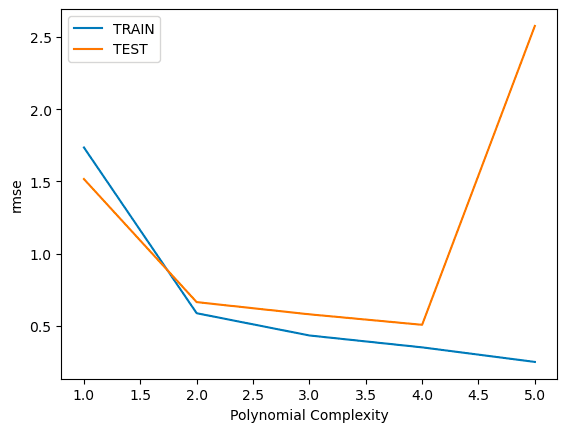
plt.plot(range(1,10), train_rmse_errors, label='TRAIN')
plt.plot(range(1,10), test_rmse_errors, label='TEST')
plt.xlabel("Polynomial Complexity (Degree)")
plt.ylabel("RMSE")
plt.legend()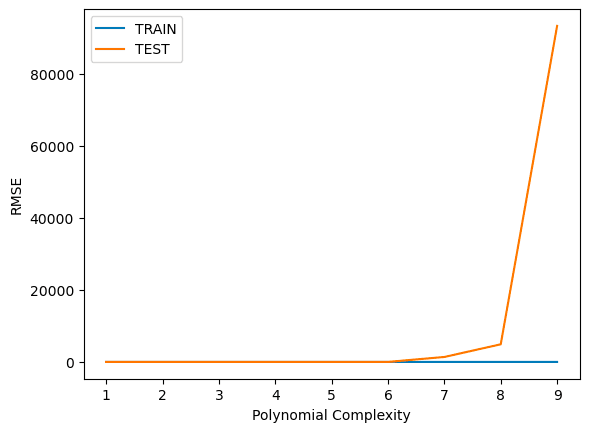
Final Model Selection
Based on test RMSE, we choose a degree = 3 model (safe side of complexity).
final_poly_converter = PolynomialFeatures(degree=3, include_bias=False)
final_model = LinearRegression()

final_model.fit(final_poly_converter.fit_transform(X), y)
Save the Model
from joblib import dump, load

dump(final_model, 'sales_poly_model.joblib')
dump(final_poly_converter, 'poly_converter.joblib')
Deployment and Predictions
When making new predictions, remember to transform the new data with the same converter.
loaded_poly = load('poly_converter.joblib')
loaded_model = load('sales_poly_model.joblib')

campaign = [[149, 22, 12]]
campaign_poly = loaded_poly.transform(campaign)
prediction = loaded_model.predict(campaign_poly)
print(prediction)