Numpy Array
1. Creating NumPy Arrays from Objects:
my_list = [1,2,3]
my_list
np.array(my_list)
my_matrix = [[1,2,3],[4,5,6],[7,8,9]]
my_matrix
np.array(my_matrix)2. Built-in Methods to create arrays:
- arange: Return evenly spaced values within a given interval
np.arange(start, stop, step) # stop is exclusivenp.arange(0,11,2) - zeros and ones: Generate arrays of zeros or ones
np.zeros(3)np.zeros((5,3))np.ones(3)np.ones(3,2) - linspace: Return evenly spaced numbers over a specified interval
Note that
.linspace()includes the stop value. To obtain an array of common fractions, increase the number of items:np.linspace(start, stop, num) # stop is inclusivenp.linspace(0,10,11) - eye: Creates an identity matrix
np.eye(N) # Creates NxN identity matrixnp.eye(4)
3. Random: Numpy also has lots of ways to create random number arrays:
- rand: Creates an array of the given shape and populates it with random samples from a uniform distribution over
[0, 1) - A uniform distribution means every value in a range has an equal probability of being selected - like rolling a fair die where each number (1-6) has the same chance.
np.random.rand(d0, d1, ..., dn) # Random samples from uniform distribution [0,1)
# Examples
np.random.rand(3) # 1D array with 3 random numbers
np.random.rand(2,3) # 2x3 matrix of random numbers- randn: Returns a sample (or samples) from the “standard normal” distribution [σ = 1]. Unlike rand which is uniform, values closer to zero are more likely to appear.
np.random.randn(d0, d1, ..., dn) # Random samples from standard normal distribution (mean=0, std=1)
# Examples
np.random.randn(3) # 1D: 3 numbers from normal distribution
np.random.randn(2,3) # 2D: 2x3 matrix from normal distribution- randint: Returns random integers from
low(inclusive) tohigh(exclusive).
np.random.randint(low, high, size=None)  # Random integers from [low, high)

# Examples
np.random.randint(10)          # One random int [0,10)
np.random.randint(1,7)         # Like rolling a die [1,6]
np.random.randint(0,10,size=5) # Array of 5 random ints [0,10)
np.random.randint(1,7,(2,3)) # 2x3 array of dice rolls- seed: Can be used to set the random state, so that the same “random” results can be reproduced.
np.random.seed(42)
np.random.rand(4)
4. Array Attributes and Methods
- Reshape: Returns an array containing the same data with a new shape
arr = np.arange(25)
ranarr = np.random.randint(0,50,10)
arr.reshape(5,5) # 5*5=25 needs to be equal
ranarr.max() # Returns maximum value
ranarr.argmax() # Returns index of maximum value
ranarr.min()
ranarr.argmin()- Shape: Shape is an attribute that arrays have (not a method)
arr = np.array([[1,2,3],[4,5,6]])
arr.shape  # Returns tuple of dimensions: (2,3)

# Examples
np.zeros(5).shape         # (5,)     1D array
np.ones((3,4)).shape     # (3,4)    2D array
np.zeros((2,3,4)).shape # (2,3,4) 3D array- dtype: You can also grab the data type of the object in the array
arr = np.array([1,2,3])
arr.dtype  # int64

# Common dtypes
np.array([1, 2]).dtype      # int64
np.array([1., 2.]).dtype    # float64
np.array(['a', 'b']).dtype  # <U1 (Unicode)
np.array([True]).dtype      # bool

# Specify dtype
np.array([1,2], dtype='float32')
NumPy Indexing and Selection
Broadcast
What it is: NumPy’s ability to perform element-wise operations on arrays of different shapes by virtually expanding smaller arrays to match larger ones. Arrays are compatible for broadcasting if their dimensions are either equal or one of them is 1 when aligned from the trailing (rightmost) dimension.
| Operation | Shape A | Shape B | Works? | Why? |
|---|---|---|---|---|
(3,) + (1,) | (3) | (1) | ✅ | B stretches to (3) |
(3,2) + (2,) | (3,2) | (2) | ✅ | B becomes (1,2) → (3,2) |
(3,3) + (4,) | (3,3) | (4) | ❌ | 3 ≠ 4 |
arr = np.arange(0,11)
arr
slice_of_arr = arr[0:6]
slice_of_arr[:]=99 # Now note the changes also occur in our original array!
arr_copy = arr.copy() # Safe to modify independently- When you slice
slice_of_arr = arr[0:6], you’re NOT getting a new array. You’re getting a window into the original array’s memory arr_copy = arr.copy()makes a full duplicate in new memory
Indexing a 2D array (matrices)
The general format is arr_2d[row][col]or arr_2d[row,col]. I recommend using the comma notation for clarity.
arr_2d = np.array(([5,10,15],[20,25,30],[35,40,45]))
arr_2d[1] #Indexing row
arr_2d[0,1]
arr_2d[:2,1:]
arr_2d[2,:]
Conditional Selection
What is Conditional Selection? It’s the ability to select elements from an array based on a boolean condition. Think of it as a “filter” that only lets through values that meet your criteria.
arr = np.arange(1,11)
arr > 4
bool_arr = arr>4
arr[bool_arr]
arr[arr>2] # or we can just use this
Common Pitfalls
- Chaining Conditions Without Parentheses:
# Wrong:
mask = arr > 2 & arr < 8  # ❌ Python evaluates `2 & arr` first!

# Correct:
mask = (arr > 2) & (arr < 8) # ✅- Modifying Original Data:
filtered_arr = arr[arr > 5].copy()
Small question:
Use numpy to check how many rolls were greater than 2. For example if dice_rolls=[1,2,3] then the answer is 1.
import numpy as np
dice_rolls = np.array([3, 1, 5, 2, 5, 1, 1, 5, 1, 4, 2, 1, 4, 5, 3, 4, 5, 2, 4, 2, 6, 6, 3, 6, 2, 3, 5, 6, 5])
total_rolls_over_two = len(dice_rolls[dice_rolls>2])
Numpy operation
1. Mathematical Operations
NumPy supports element-wise operations, meaning operations are applied to each element individually.
Key Operations:
-
Arithmetic:
+,-,*,/,**(power) -
Trigonometric:
np.sin(),np.cos(),np.tan() -
Exponential/Logarithmic:
np.exp(),np.log()
arr = np.array([1, 2, 3])

# Element-wise operations
squared = arr ** 2  # [1, 4, 9]
sqrt = np.sqrt(arr)  # [1.0, 1.414, 1.732]
2. Statistical Operations
NumPy makes it easy to compute descriptive statistics.
Key Functions:
-
np.mean(),np.median(),np.std()(standard deviation) -
np.min(),np.max(),np.sum()
arr = np.array([1, 2, 3, 4, 5])

# Statistics
mean = np.mean(arr)  # 3.0
std_dev = np.std(arr)  # 1.414
total = np.sum(arr)  # 15
3. Axis Logic
Let’s break down axis logic in NumPy with your 2D array example. Imagine axis 0 as vertical movement (up/down rows) and axis 1 as horizontal movement (left/right columns). Think of it like navigating a spreadsheet:
import numpy as np

arr_2d = np.array([
    [1, 2, 3, 4],   # Row 0 (axis 0)
    [5, 6, 7, 8],   # Row 1 (axis 0)
    [9, 10, 11, 12] # Row 2 (axis 0)
])
# Columns: 0  1   2   3 (axis 1)
arr_2d.sum(axis=0) :Sums values vertically (along rows) for each column.
summing along axis 0 collapses the rows, keeping the columns.
Maybe like stacking books vertically. Each row is a shelf, and summing vertically adds the books in each position across shelves.
Axis 1 (Columns): Collapse columns, keep rows.
Exercise
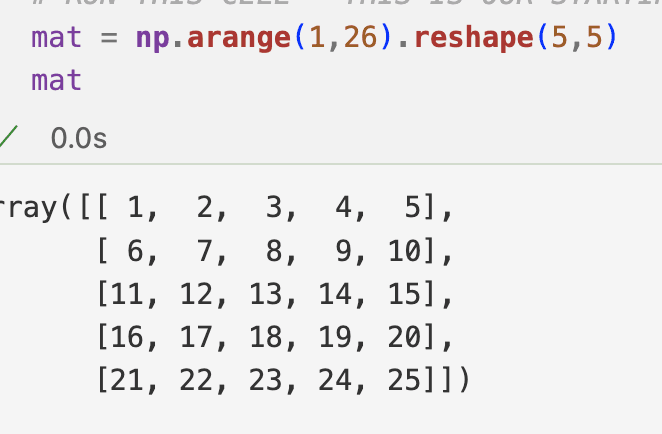 to have this kind of output:
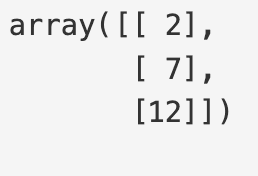
mat[:3,1:2]